Defining Time Schedules with CRON Syntax
In the Mervis system, you will frequently need to schedule recurring automated tasks—such as defining how often a DataNode communicates with an external API or database. To define these precise schedules, Mervis uses standard CRON syntax.
The most common place you will encounter this is in the DataNode type properties under the `CommTaskCron` field.
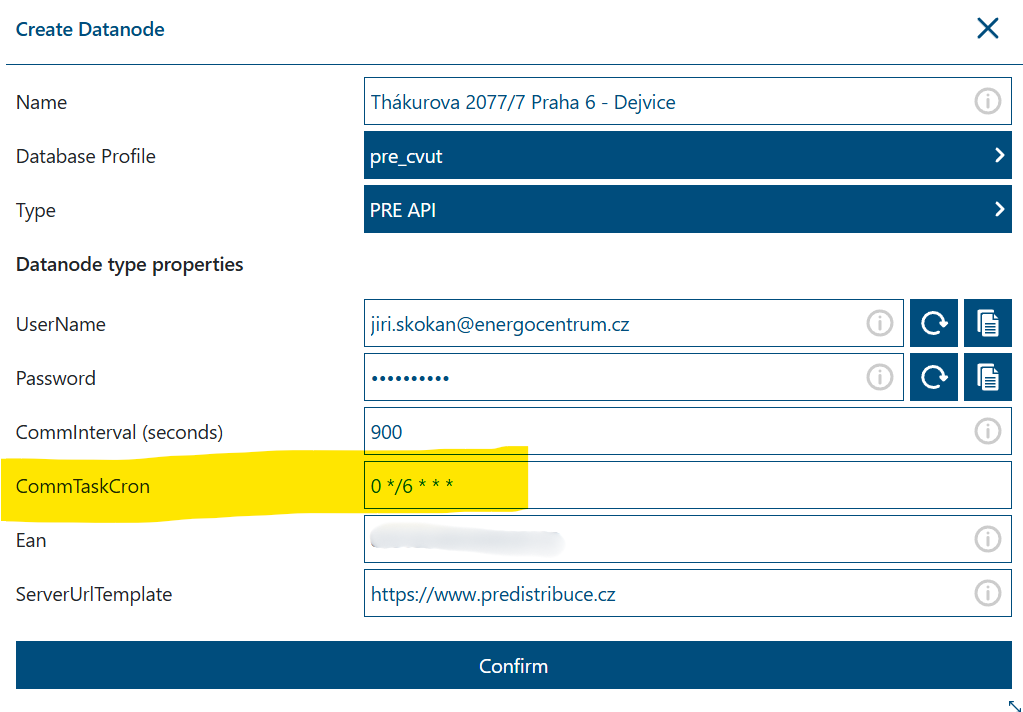
Understanding CRON Structure
A CRON expression is a string consisting of five fields separated by spaces. Each field represents a specific unit of time.
The standard format is:
* * * * *
From left to right, the fields represent:
- Minute (0 - 59)
- Hour (0 - 23)
- Day of the Month (1 - 31)
- Month (1 - 12)
- Day of the Week (0 - 7, where both 0 and 7 represent Sunday)
Special Characters
To create flexible schedules, you can use the following special characters within the fields:
- `*` (Asterisk): Represents “every” or “any” value. If you put an asterisk in the Hour field, it means “every hour.”
- `/` (Slash): Used to specify increments or “step” values. For example, `*/15` in the Minute field means “every 15 minutes.”
- `-` (Hyphen): Defines a range of values. For example, `9-17` in the Hour field means “every hour from 9 AM to 5 PM.”
- `,` (Comma): Used to separate individual items in a list. For example, `1,3,5` in the Day of the Week field means “Monday, Wednesday, and Friday.”
Common CRON Examples
Here is a cheat sheet of the most common CRON expressions used for DataNode communication and automated tasks:
| CRON Expression | Description / Schedule |
|---|---|
| `0 */6 * * *` | Every 6 hours (at minute 0). (This is the example shown in the image above) |
| `* * * * *` | Every minute of every day. |
| `*/5 * * * *` | Every 5 minutes. |
| `*/15 * * * *` | Every 15 minutes. |
| `0 * * * *` | Every hour, at the top of the hour (minute 0). |
| `30 * * * *` | Every hour, at 30 minutes past the hour. |
| `0 0 * * *` | Every day at Midnight (00:00). |
| `30 8 * * *` | Every day at 8:30 AM. |
| `0 8-18 * * *` | Every hour between 8:00 AM and 6:00 PM. |
| `0 8 * * 1-5` | Every weekday (Monday to Friday) at 8:00 AM. |
| `0 0 * * 0` | Every Sunday at Midnight. |
| `0 0 1 * *` | The 1st day of every month at Midnight. |
Important Note: When writing CRON expressions, pay close attention to the spaces between the asterisks and numbers. Missing a space or adding an extra one will cause the schedule to fail.