The World of Mervis - Knowledge Base
    Translations of this page:
    • cs 
    • en 

  1. You are here
  2. Home
  3. Welcome to the Mervis Knowledge Base
  4. Mervis IDE/RT
  5. Mervis IDE/RT to DB Configuration

Menu
  • Ancillary services
  • Best Practice
  • Help
  • Licensing & Pricing
  • Mervis DB
  • Mervis IDE/RT
    • Download
    • Communication protocols
      • Modbus
      • SSCP protocol
      • SoftPLCLink
      • Watt Price Driver (.Net)
    • FUPLA (Function Block Diagram) Language
    • Help
      • Basic description of the Mervis IDE
      • Start the IDE
      • Process station, or controller (PLC)
      • Communication protocols description
      • Server Communication Protocols
      • New Project
      • Description of HMI Editor
      • Software
    • Mervis RT
      • Installation of Mervis RT for Wago PLC
      • Mervis RT as a Windows Service
      • .Net Server for Mervis RT
    • Structured Text
    • Webpanel
      • Webpanel API
    • PlcTool
    • Mervis IDE/RT to DB Configuration
  • Proxy & CloudAccess
  • Mervis SCADA
  • RcWare
  • Research
  • Mervis Tutorials

Mervis IDE/RT to DB Configuration

You can save data from Mervis RT (or Merbon RT) directly to the Mervis DB.

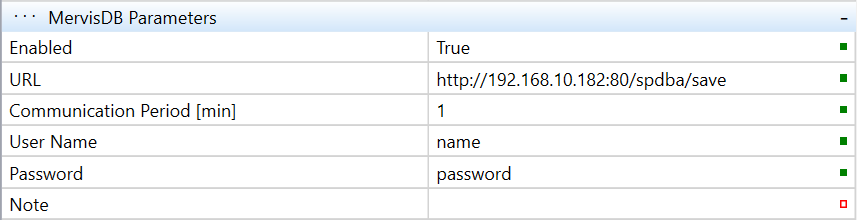
The basic configuration looks like this:
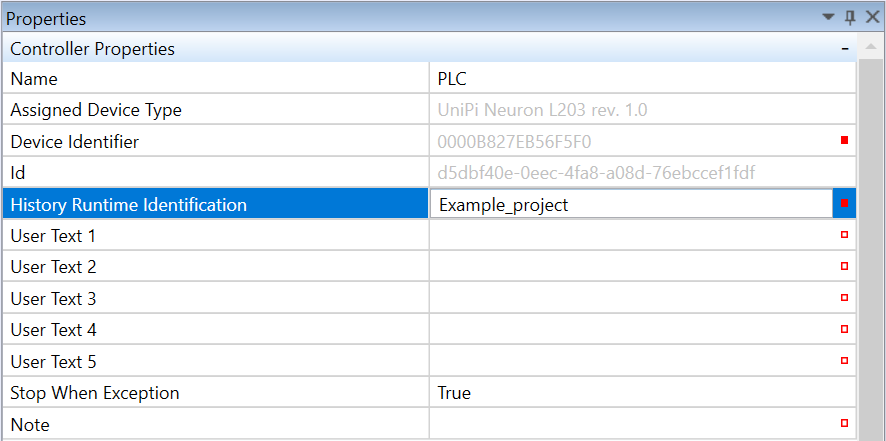
Important: Define “History Runtime Identification” unique for each controller!
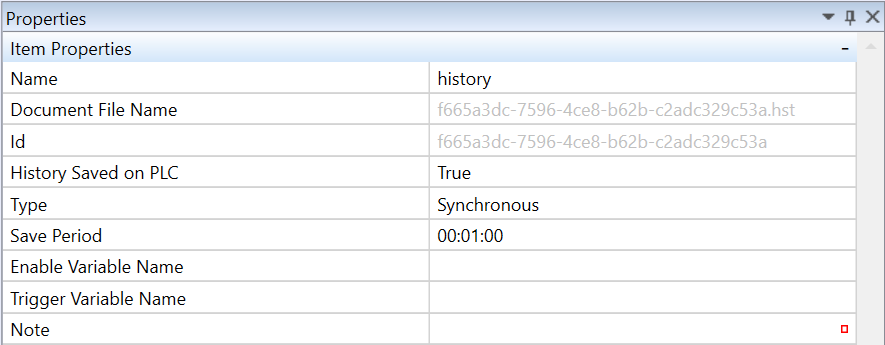
Don't forget to define some “history” - for more info check Mervis IDE help but it should look like this:
Step-by-step Configuration for UniPi Controllers

https://kb.unipi.technology/en:sw:01-mervis:storing-data-to-mervis-db-hidden

  • © Energocentrum Plus, s.r.o. 2017 - 2026
Log In