This is an old revision of the document!
API
Mervis DB supports open SOAP API described by this WSDL:
Contact technical support for other non-public APIs that can be used for your projects.
List of supported functions
| Function | Description |
|---|---|
| SaveData | Save one or multiple records from one or multiple variables |
| GetData/GetDataAsync | Read one or multiple records from one or multiple variables. |
| GetParticularData/GetParticulatDataAsync | Optimized method for reading of “special” data - last value, last value after certain time moment etc. |
| GetVariables | Get the list of variables. |
| GetAllVariables | |
| ServerAlive | Obsolete |
| DeleteVariables | |
| DeleteData | |
| EnsureVariables | |
| GetTransformedData/GetTransformedDataAsync | |
| GetServerVersion | |
| GetVariableStats | Obsolete |
| GetVariableStatsAsync | Obsolete |
| CheckCredentials |
Examples
C#
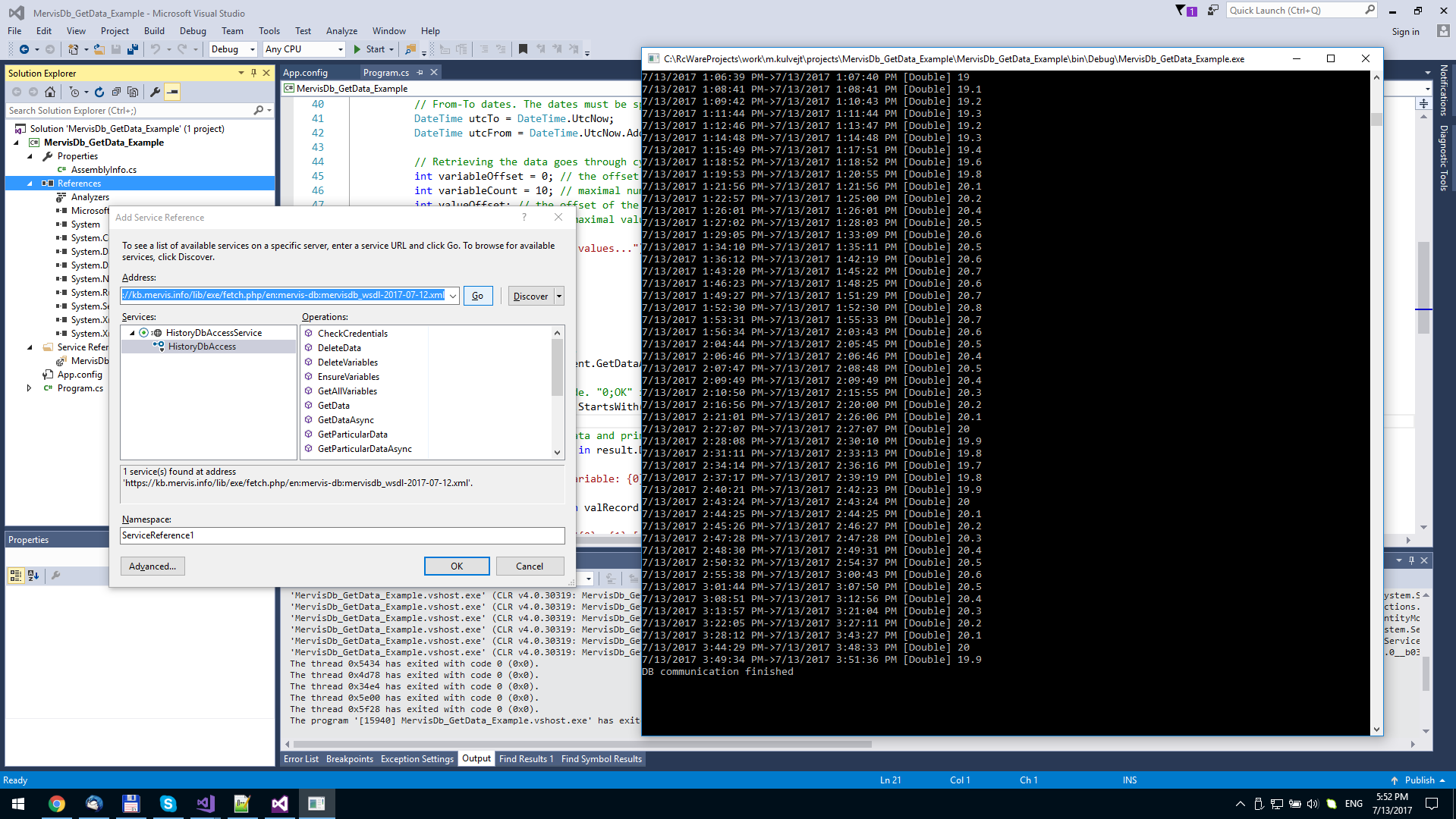
Download
mervisdb_getdata_example.zip mervisdb_savedata_example.zip === Code === <code csharp MervisDB_GetData_Example.cs> using System; using System.Linq; using System.Threading.Tasks; using MervisDb_GetData_Example.MervisDbService; namespace MervisDb_GetData_Example { class Program { static void Main(string[] args) {
 // Demo of asynchronous methods.
 //
 var task = Task.Run(async() => {
  //
  // Create access to the real server.
  // Without SSL connections, you have to remove binding parameters "<security mode="Transport"/>" in the App.config.
  // The client is automatically generated from the WSDL file available here: https://kb.mervis.info/doku.php/en:mervis-db:10-api
  //
  using(HistoryDbAccessClient client = new HistoryDbAccessClient("HistoryAccess", "https://localhost:9876/RcWareDbAccess")) {
   // Authentication credetials in the database.
   Credentials credentials = new Credentials {
    Name = "XXXX", Password = "YYYY"
   };
   // Specification of the variables through Key-Value.
   // Here we use 2 variables.
   KeyValuePair[][] keys = new KeyValuePair[][] {
    new KeyValuePair[] {
      new KeyValuePair {
       Key = "DPGuid", Value = "338E2882-D72B-4D17-A241-73E8BC30F458"
      }, new KeyValuePair {
       Key = "StationName", Value = "AAABBB"
      }
     },
     new KeyValuePair[] {
      new KeyValuePair {
       Key = "DPGuid", Value = "CC80211D-3D29-4CC2-91A2-F69483D566B5"
      }, new KeyValuePair {
       Key = "StationName", Value = "AAABBB"
      }
     }
   };
   // From-To dates. The dates must be specified in the UTC time zone.
   DateTime utcTo = DateTime.UtcNow;
   DateTime utcFrom = DateTime.UtcNow.AddDays(-1);
   // Retrieving the data goes through cycling of values and variables. The server returns recommended values needed for the the next cycle.
   int variableOffset = 0; // the offset of the variable
   int variableCount = 10; // maximal number of variables returned in one request
   int valueOffset; // the offset of the value
   int valueCount = 1000; // maximal values in on request
Console.WriteLine("Reading values...");
   do {
    valueOffset = 0;
    do {
     // Execute the request.
     var result = await client.GetDataAsyncAsync(credentials, keys, utcFrom, utcTo, variableOffset, variableCount, valueOffset, valueCount);
     // Check the return code. "0;OK" is what we want.
     if (!result.ReturnCode.StartsWith("0;")) {
      Console.WriteLine("Error on reading: {0}", result.ReturnCode);
     }
     // Cycle through the data and print it out.
     foreach(var valRecord in result.Data) {
      Console.WriteLine("Variable: {0}", String.Concat(valRecord.Keys.Select((i) => {
       return String.Format("{0}={1}; ", i.Key, i.Value);
      })));
      foreach(var value in valRecord.Vals) {
       Console.WriteLine("{0}->{1} [{2}] {3}", value.Ts, value.Gt, value.Hvt, value.Dv /* Use value type according to the Hvt (History Value Type) */ );
      }
     }
     valueOffset = result.NextValueOffset;
     variableOffset = result.NextVariableOffset;
    }
    while (valueOffset != -1);
   }
   while (variableOffset != -1);
  }
 });
Console.WriteLine("DB communication is running in background");
 try {
  task.Wait();
 } catch (Exception exc) {
  Console.WriteLine("Exception: {0}", exc.ToString());
 }
Console.WriteLine("DB communication finished");
 Console.ReadLine();
}
} }</code>
- MervisDB_SetData_Example.cs
using System;
using System.Collections.Generic;
using System.Threading.Tasks;
using MervisDb_SaveData_Example.MervisDbService;

namespace MervisDb_SaveData_Example
{
	class Program
	{
		static void Main(string[] args)
		{
			//
			// Demo of asynchronous methods.
			//
			var task = Task.Run(async () =>
			{
				//
				// Create access to the real server.
				// Without SSL connections, you have to remove binding parameters "<security mode="Transport"/>" in the App.config.
				// The client is automatically generated from the WSDL file available here: https://kb.mervis.info/doku.php/en:mervis-db:10-api
				//
				using (HistoryDbAccessClient client = new HistoryDbAccessClient("HistoryAccess", "https://localhost:9876/RcWareDbAccess"))
				{
					// Authentication credetials in the database.
					Credentials credentials = new Credentials { Name = "XXXX", Password = "YYYY" };

					// Adding records...
					List<ValueRecord> records = new List<ValueRecord>();

					DateTime utcTimeStamp = new DateTime(2018, 1, 1, 12, 0, 0, DateTimeKind.Utc);

					// Each value is stored in a ValueRecord structure
					ValueRecord rec = new ValueRecord();

					rec.UtcTimeStamp = utcTimeStamp;                // time stamp of the value, UTC date time must be used
					rec.HistoryValueType = HistoryValueType.Double; // type of the value
					rec.DoubleValue = 23.4;                         // value itself
					rec.Interval = 60.0;                            // sampling period in seconds. When the difference of timestamps of subsequent values if greater than 1.1 multiple of the interval, the data should be considered incomplete.
					rec.Keys = new KeyValuePair[]										// identification of the variable. At least one key-value pair must be "IsKey" to identify a variable.
					{
						new KeyValuePair { IsKey = true, Key = "Root", Value = "Building A"},
						new KeyValuePair { IsKey = true, Key = "Level1", Value = "Floor 1"},
						new KeyValuePair { IsKey = true, Key = "Level2", Value = "Room 7"},
						new KeyValuePair { IsKey = true, Key = "Level3", Value = "Temperature"},
						new KeyValuePair { IsKey = false, Key = "Description", Value = "Temperature in the room 7"},
						new KeyValuePair { IsKey = false, Key = "Unit", Value = "°C"},
					};

					records.Add(rec);

					// Save data method returns the number of stored records
					int recordsSaved = await client.SaveDataAsync(credentials, records.ToArray());

					Console.WriteLine("Records saved: {0}", recordsSaved);
				}
			});

			Console.WriteLine("DB communication is running in background");

			try
			{
				task.Wait();
			}
			catch (Exception exc)
			{
				Console.WriteLine("Exception: {0}", exc.ToString());
			}

			Console.WriteLine("DB communication finished");

			Console.ReadLine();
		}
	}
}
Matlab
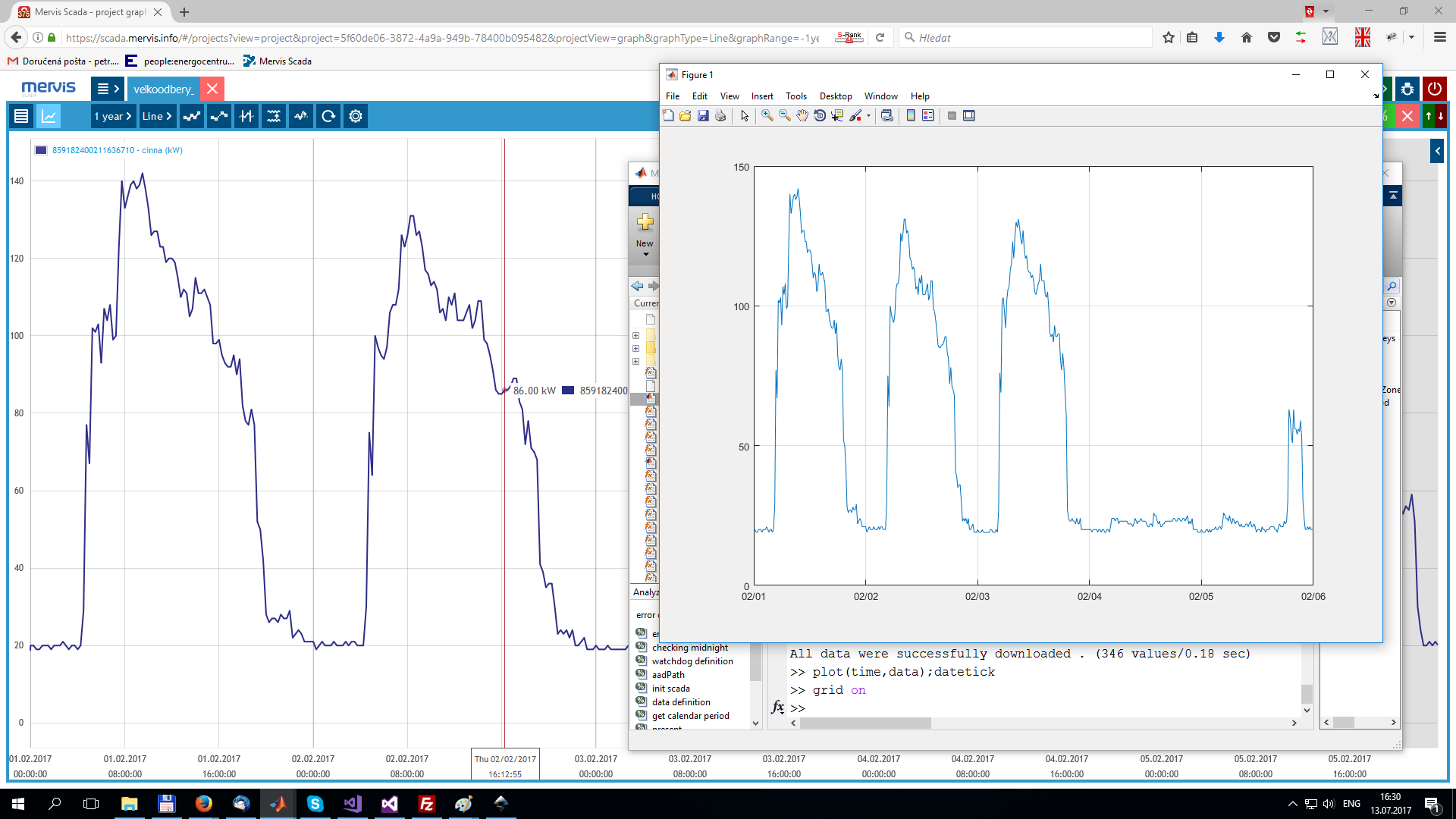
Supported functions
| Function | Description |
|---|---|
| SaveData | Save one or multiple records from one or multiple variables |
| GetData | Read one or multiple records from one or multiple variables. |
| GetDataUnmerged | Read one or multiple records from one or multiple variables. Allow more setting options than GetData function |
| GetDataOrigin | Read data exactly as are stored in the database. |
| DeleteVariable | Delete entire variable or some certain interval. |
| GetRequiredTimestamp | Get time stamp depending on input options. |
Toolbox
You need to import specialized toolbox to communicate with Mervis DB from Matlab:
- There is a help available for all toolbox functions. To display the help use:
help MervisDatabase.supported_function_name
Code
- MervisDB_GetData_example.m
% Instance of Mervis DB
mervisDB = MervisDatabase('username', 'password', 'dbUrl');

% Time interval definition
from = localMatlab2utcMatlab(datenum(2017, 1, 1)); %1.1.2017 in utc
to = localMatlab2utcMatlab(datenum(2017, 31, 1)); %31.1.2017 in utc
samplePeriod = 5*60; % 5 minutes
outputTimeZone = 'Local'; % possible 'Local' or  'Utc' parameter;

% Specifying varibles to download
varKeys1 = {'DPGuid', '338E2882-D72B-4D17-A241-73E8BC30F458';...
            'StationName', 'XXXXXXX'}; % Keys definition of first variable
varKeys2 = {'DPGuid', 'CC80211D-3D29-4CC2-91A2-F69483D566B5';...
            'StationName', 'YYYYYYY'}; % Keys definition of second variable

variable1 = MervisDbVariable(varKeys1); % Create MervisDbVariable object from defined keys
variable2 = MervisDbVariable(varKeys2);

arrayOfVarKeys = [variable1; variable2]; % array of MervisDbVariables objects

% help for function getData
help MervisDatabase.getData

% Download required data
[data, time] = db.getData(arrayOfVarKeys, from, to, samplePeriod, outputTimeZone);

% Get all variables with defined keys
allVaribales = db.getAllVars(varKeys1);
PHP
Code
- MervisDB_GetData_example.php
<?php
/*
Mervis DB PHP example - getdata
*/
try {

  $soapClient = new SoapClient('./wsdl/singlewsdl.xml', array(
    'compression' => SOAP_COMPRESSION_ACCEPT | SOAP_COMPRESSION_GZIP,
    'trace' => 0,
    'features' => SOAP_SINGLE_ELEMENT_ARRAYS
  ));
  $soapClient->__setLocation('http://localhost:9876/RcWareDbAccess');

  $credentials = array(
    'Name' => 'XXXXXXX',
    'Password' => 'YYYYYYY'
  );

  $utcTZ   = new DateTimezone('UTC'); //all time realted values are expected in UTC
  $utcFrom = new DateTime('-120minutes', $utcTZ); //
  $utcTo   = new DateTime('now', $utcTZ); //

  $valOffset = 0;
  $valCount  = 20; //how many values should be returned in one request at most. Recommended value: 5000
  $varOffset = 0;
  $varCount  = 4; //how many variable should be returned in on request at most

  $variablesKey = array(
    array(
      array(
        'IsKey' => true,
        'Key' => 'DPGuid',
        'Value' => '338E2882-D72B-4D17-A241-73E8BC30F458'
      ),
      array(
        'IsKey' => true,
        'Key' => 'StationName',
        'Value' => 'AAAAAAAAAA'
      )
    ),
    array(
      array(
        'IsKey' => true,
        'Key' => 'DPGuid',
        'Value' => 'CC80211D-3D29-4CC2-91A2-F69483D566B5'
      ),
      array(
        'IsKey' => true,
        'Key' => 'StationName',
        'Value' => 'BBBBBBB'
      )
    )
  );

  echo "Reading values from: {$utcFrom->format('c')} to: {$utcTo->format('c')}\n\n";

  $counter = 0;

  do {
    $response  = null;
    $valOffset = 0;
    do {
      $response  = $soapClient->GetData(array(
        'credentials' => $credentials,
        'variablesKey' => $variablesKey,
        'utcFrom' => $utcFrom->format('Y-m-d\TH:i:s\Z'),
        'utcTo' => $utcTo->format('Y-m-d\TH:i:s\Z'),
        'valueOffset' => $valOffset,
        'valueCount' => $valCount,
        'variableCount' => $varCount,
        'variableOffset' => $varOffset
      ));
      $valOffset = $response->nextValueOffset;
      $varOffset = $response->nextVariableOffset;

      foreach ($response->GetDataResult->Mvr as $varArray) {
        foreach ($varArray->Keys->KeyValuePair as $kvp) //the set of keys depends on the source of the data
          {
          if ($kvp->Key == 'DPName') {
            echo "\n{$kvp->Value}\n";
            $counter++;
          }
        }

        if (isset($varArray->Vals->I)) {
          foreach ($varArray->Vals->I as $val) {
            echo "  t: {$val->Ts}   Interval: {$val->Ivl}  {$valOffset} {$varOffset}\n";
          }
        } else {
          echo "empty\n";
        }

      }

    } while ($response->nextValueOffset != -1); //-1 - no more data available
  } while ($response->nextVariableOffset != -1); //-1 - no more data available
}
catch (Exception $e) {
  print_r($e);
}
?>