Table of Contents
Mervis SCADA Project Generator
The Mervis SCADA Project Generator is a web-based utility designed to automate the creation of large-scale SCADA projects.
Instead of manually configuring thousands of data points, alarms, and history settings one by one, this tool allows you to generate complete project structures instantly using Excel sheets or configuration files.
The tool is available at: generator.mervis.info.
Key Features
- Bulk Processing: Create thousands of datapoints, groups, and attributes in seconds.
- Excel Integration: Map external data (such as Modbus registers or variable lists) to SCADA points using standard `.xlsx` files.
- Multi-Protocol Support: Generate projects from various sources including Mervis DB, Modbus TCP, SSCP, and Amit controllers.
- Standardization: Ensure consistent naming conventions and unit transformations across your projects.
Interface Overview & How It Works
Below is the main interface of the Mervis Project Generator:
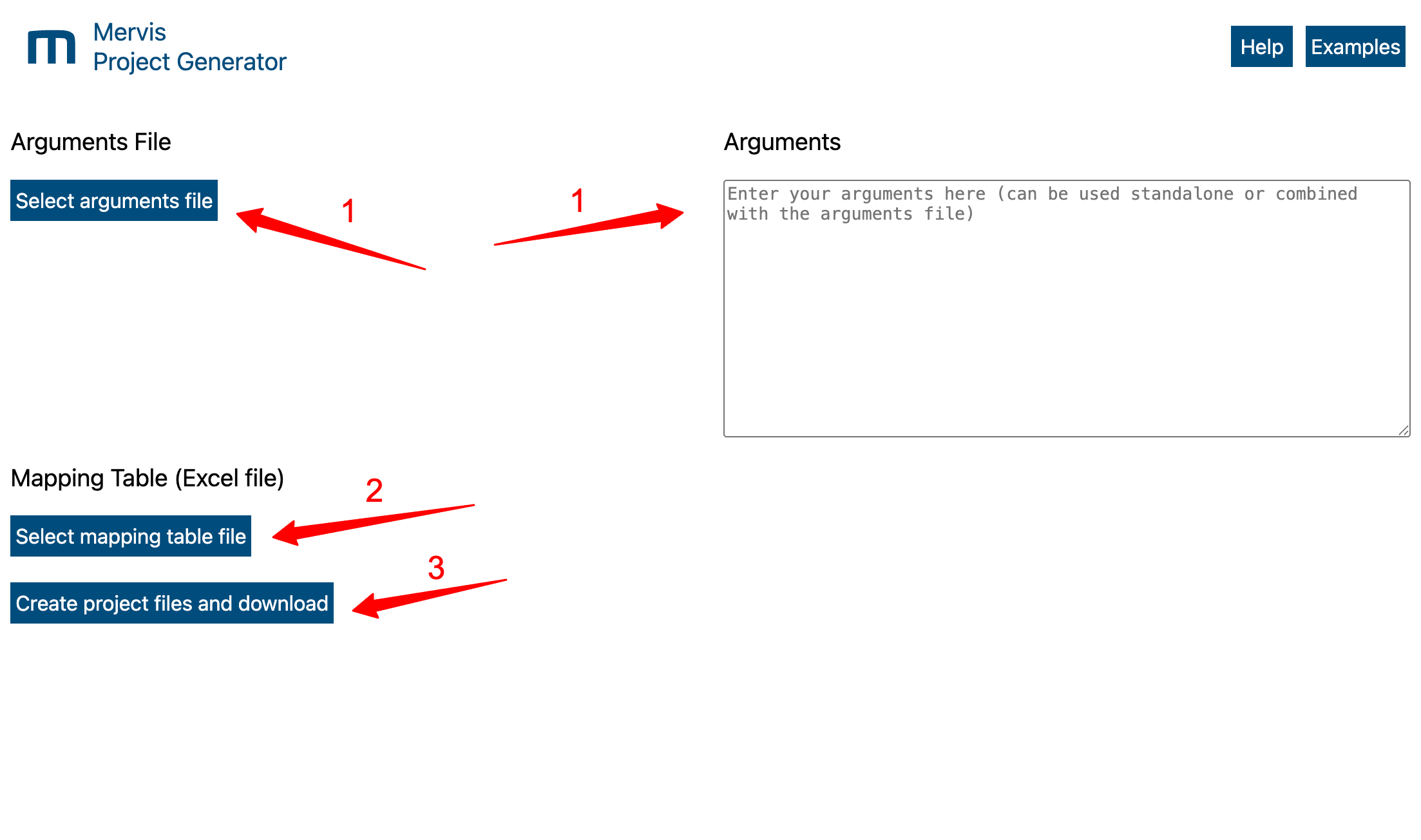
The generator uses a simple workflow, utilizing the specific areas highlighted in the image above:
- Define Arguments: Upload a prepared parameter text file using the Select arguments file button, OR paste your arguments directly into the Arguments text box on the right. *(Note: Ensure your parameters comply with the latest Data Hub credential requirements. See Help section for details).*
- Upload Mapping Table: Upload your Excel mapping table (`.xlsx`) using the Select mapping table file button.
- Generate & Download: Click the Create project files and download button to generate and save your new project definition file to your computer.
- Import to SCADA: Finally, upload the resulting file into your Mervis SCADA portal to complete the process.
Documentation
Select a section below for detailed instructions and downloadable samples:
- Help & Configuration - Detailed reference for configuration parameters, mapping syntax, and driver setups. (Includes important security and permission requirements).
- Examples - Downloadable sample files (XLSX, TXT) for common scenarios.