Table of Contents
Login
On a computer with internet access, enter the web address https://scada.mervis.info, where the initial login screen will appear. The login credentials consist of a username and password.
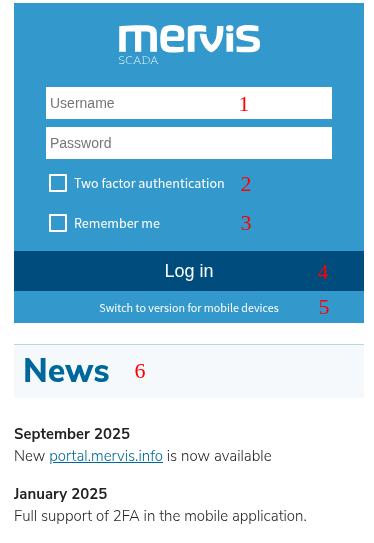
- 1 – field for entering the username and password
- 2 – show / hide the section for entering details for multi-factor authentication
- 3 – enable / disable saving login credentials for the next login (if saving is enabled and the login token is still valid, the user will be logged in automatically)
- 4 – login button
- 5 – link to switch to the mobile version of the site (see PWA)
- 6 – news page of scada.mervis.info (see News)
Multi-factor Authentication
After checking the box for multi-factor authentication, an additional section for entering multi-factor authentication details will appear. To use multi-factor authentication, the user must have the appropriate parameters configured in the Portal application (see Multifactor settings).
There are two available authentication methods:
- TOTP – login using a one-time password
- SMS – login using an SMS code
TOTP Multi-factor Authentication
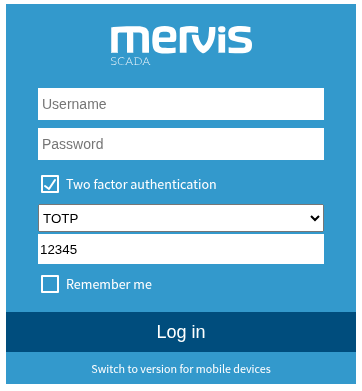
When using TOTP multi-factor authentication, it is necessary to enter the TOTP (one-time password) along with the username and password.
SMS Multi-factor Authentication
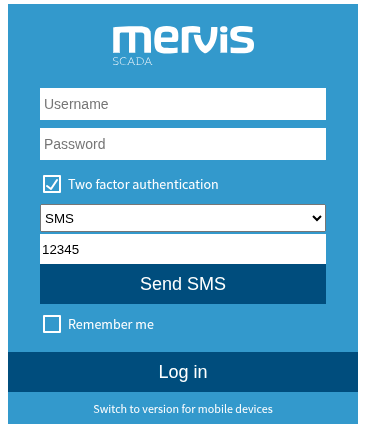
When using SMS multi-factor authentication, first click the button to send the SMS code, and then enter this code along with the username and password.
Password Policies
Password strength and policies depend on the settings of the domain parameters to which the logging user belongs. These parameters can be configured in the Portal application (see Edit Subdomain).