Table of Contents
Datanodes
| Datanode | Represents a virtual device that provides data from various physical devices or external services. It contains one or more signals, variables, or values used by the Mervis SCADA system. |
| Datahub | Manages your datanode and handles its communication and data storage. |
The datanode type determines how data is acquired:
- IoT LoRa types (e.g., uh30, prolora, elliot…) – receive data from ČRA and usually correspond to a specific physical device such as an electricity or water meter.
- HTTP types (e.g., gasnet, spotrebapodpalcem, distribuce24…) – actively retrieve data from external APIs. These don’t always correspond to a single device – data may be aggregated, processed by a service, or a single datanode may serve hundreds of physical devices.
In the user interface, you can configure basic parameters and type-specific properties of the datanode. It is also possible to assign a datanode to a datahub, especially if multiple datahubs are available in the domain.
| Datahub | Manages your datanode and handles its communication and data storage. |
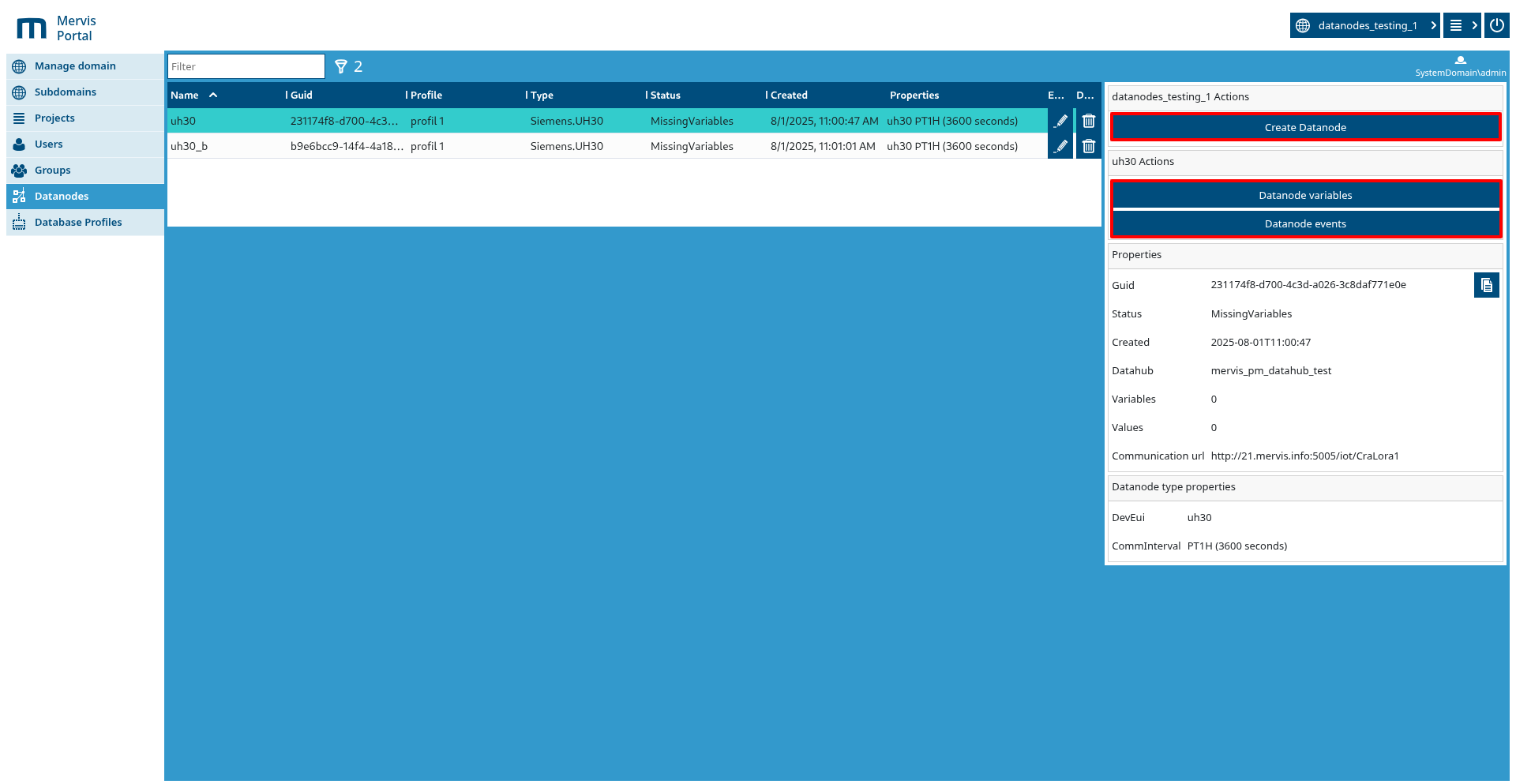
Main actions:
- Edit Datanode – allows you to modify the parameters of an existing datanode

- Delete Datanode – allows you to delete the selected datanode


Buttons:
- Create Datanode – opens a modal window for creating a new datanode
- Datanode Variables – opens a modal window displaying the datanode’s variables
- Datanode Events – opens a modal window displaying the datanode’s events
Create Datanode
Modal window for creating a new datanode
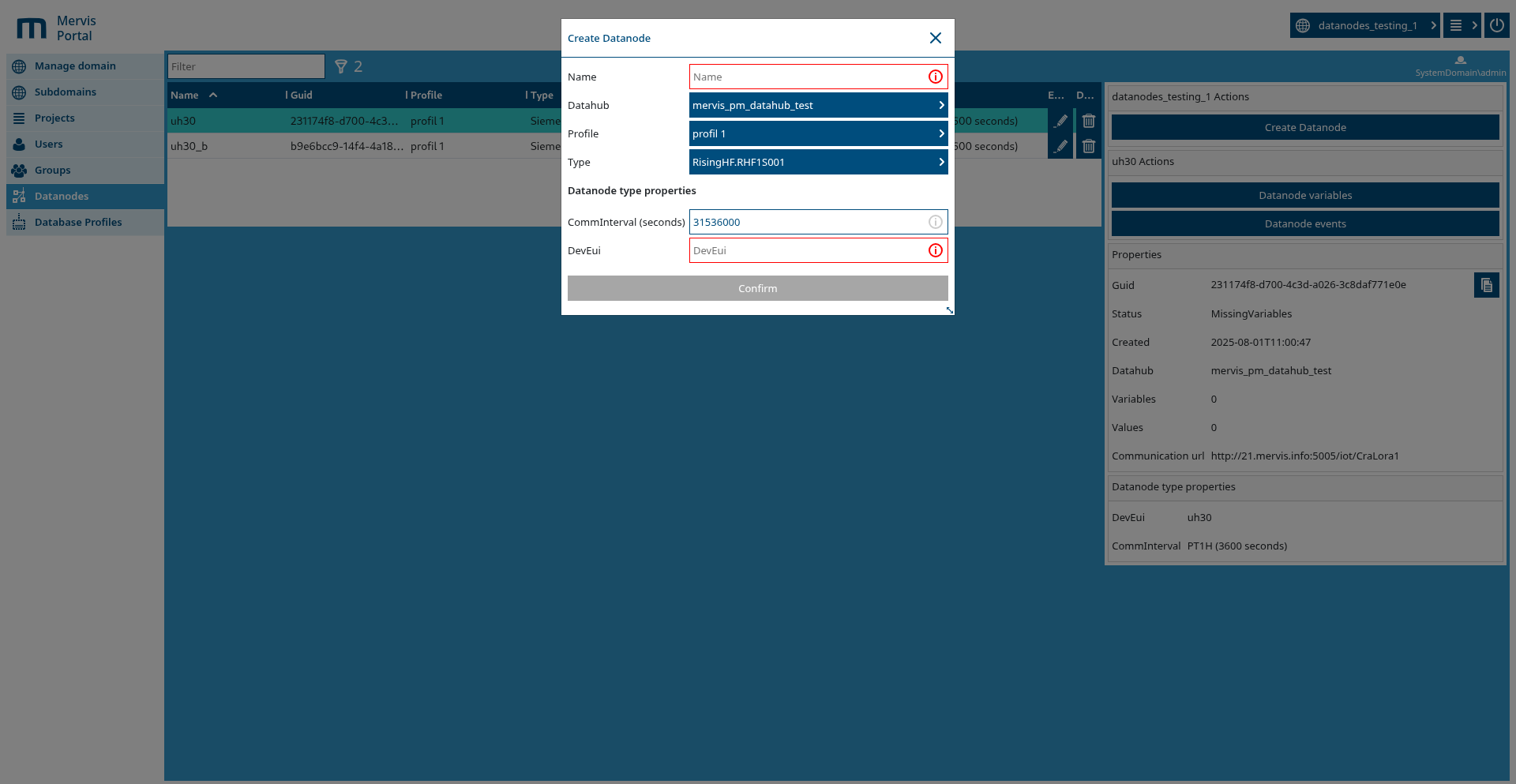
In this window, you can set the datanode parameters:
- Name – the name of the datanode
- Datahub – select the datahub. If there is only one available in the domain, this field is hidden. Otherwise, select the one that matches the datanode's configuration and type.
- Database profile – the datanode’s database profile
- Type – the type of datanode, which determines which properties are configurable
- Datanode type properties – properties specific to the selected datanode type.
If a row is highlighted in red, it is a required field and must be filled in.
  If not highlighted, the property is optional and may remain empty.
  Some fields may have default values pre-filled.
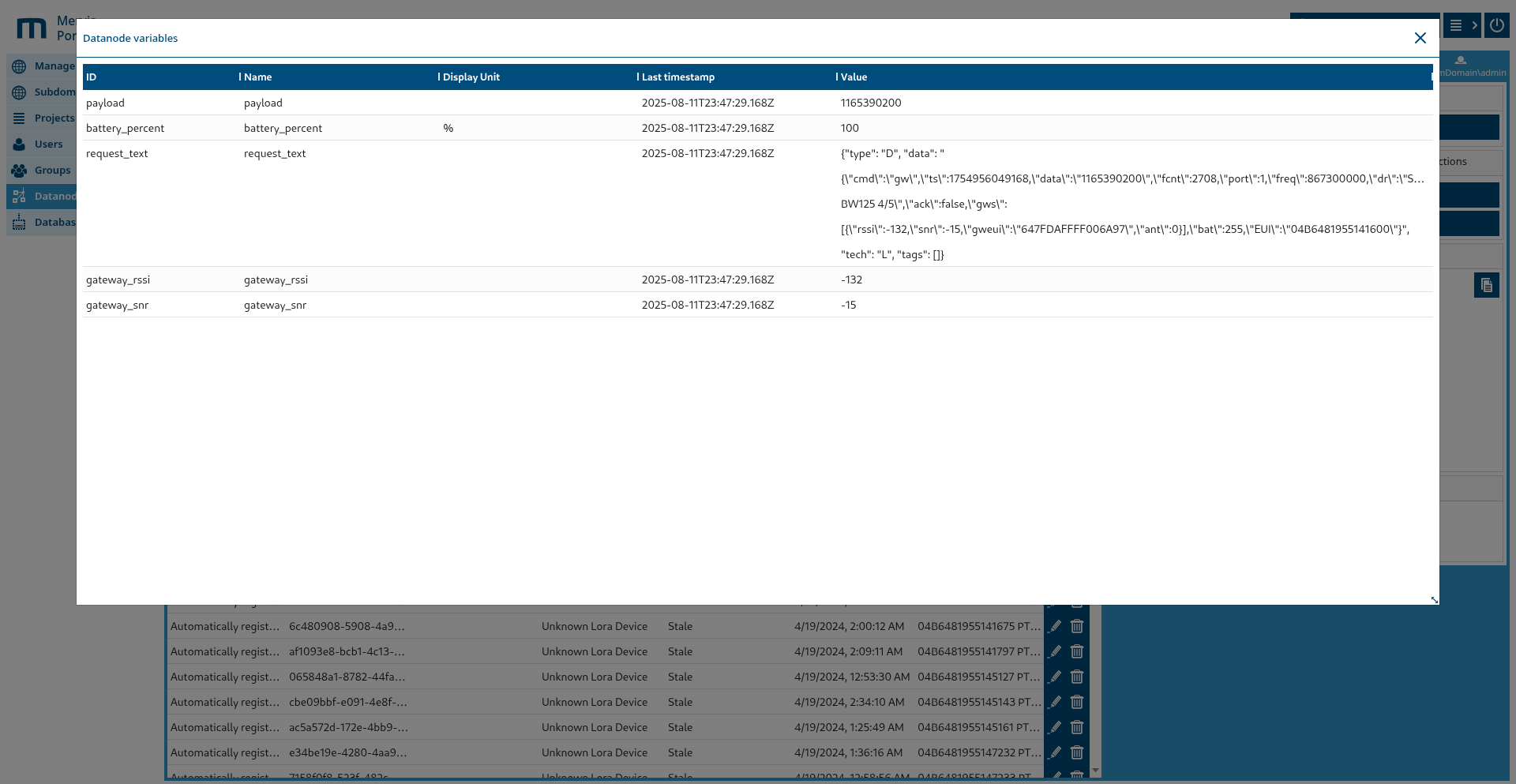
Datanode Variables
Modal window showing a list of available datanode variables and their most recent known value in the Mervis system, along with a timestamp.
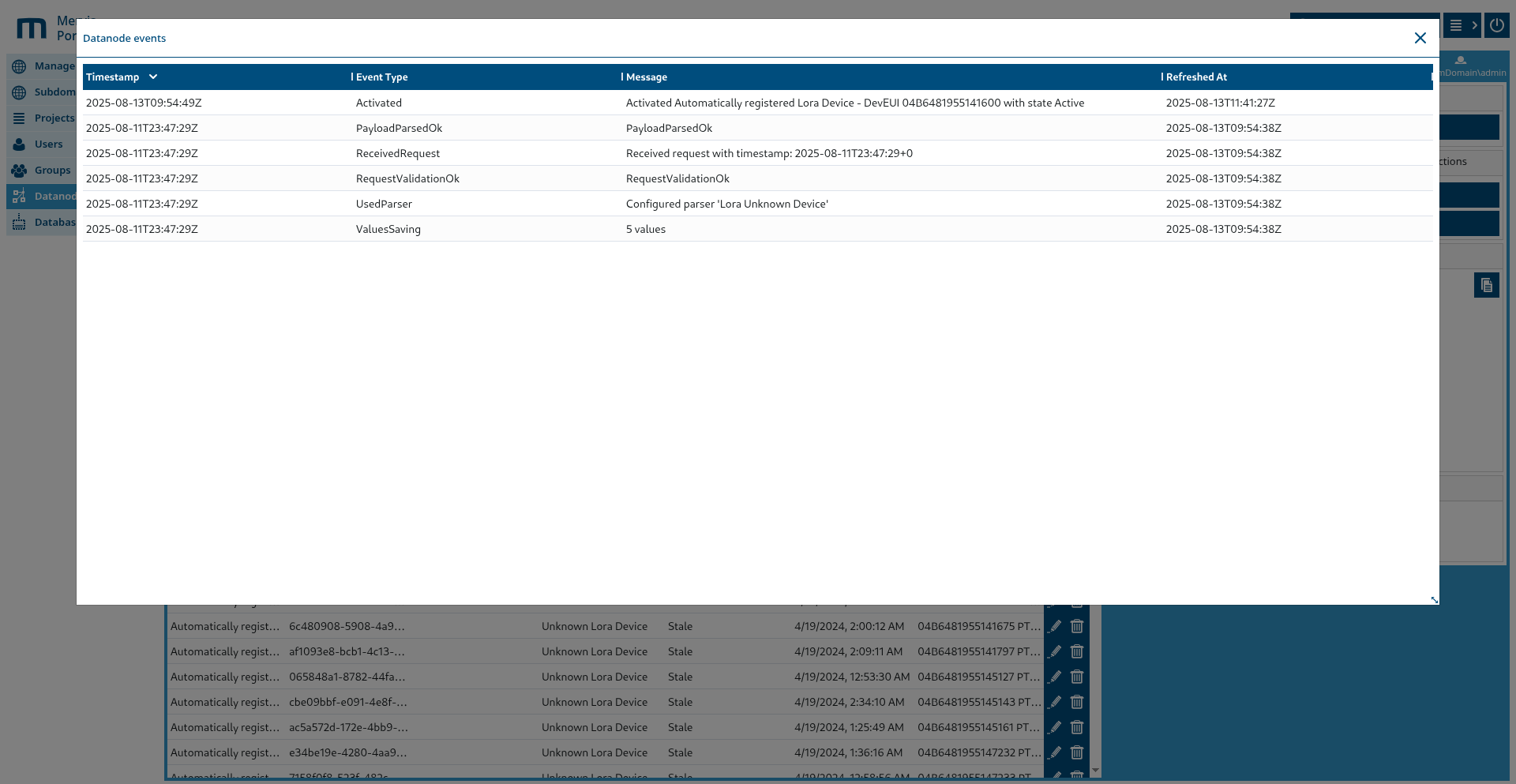
Datanode Events
Modal window displaying the events of the datanode. This shows the current status of the given datanode and is useful for diagnosing datanode errors.
Datanode types
EGD.Distribuce24 (C3601F41-CF30-4F4E-88F3-389FE75FAE76)
- Description
- Downloads 15-min measured data (profiles ICC1, ISC1, IKC1, IMC1, ICCS) from EGD Distribuce24 OpenAPI.
- Instructions for obtaining client_id and client_secret
- Log in to portal.distribuce24.cz using your existing customer credentials (e-mail from registration + password — note this is not the API credentials).
- Go to the Account Management section.
- Open the Remote Access - OpenAPI tab.
- Click the Generate client_id and client_secret button.
- Properties
- ServerUrlTemplate: template of the base REST API URL (required)
- UserName: client_id (required)
- Password: client_secret (required)
- CommInterval: interval of regular data downloading in TimeSpan format, e.g. 01:00:00 (required)
- CommTaskCron: optional cron expression for scheduling downloads; takes precedence over CommInterval (optional)
- Ean: EAN of the consumption point, 18 digits (required)
- AuthUrlTemplate: URL of the token (OAuth2) endpoint for obtaining the access token (required)
CEZ API (A1B2C3D4-5E6F-7A8B-9C0D-E1F2A3B4C5D6)
- Description
- Downloads the export of measured data from the ČEZ Distribuce customer portal.
- Instructions
- UserName and Password are the login credentials for the ČEZ Distribuce customer portal.
- Ean = EAN of the consumption point (opmId parameter).
- Properties
- ServerUrlTemplate: template of the base REST API URL (required)
- UserName: username for the ČEZ Distribuce portal (required)
- Password: password for the ČEZ Distribuce portal (required)
- CommInterval: interval of regular data downloading in TimeSpan format, e.g. 01:00:00 (required)
- CommTaskCron: optional cron expression for scheduling downloads; takes precedence over CommInterval (optional)
- Ean: EAN of the consumption point, 18 digits (required)
PRE API (B3C4D5E6-7F8A-9B0C-D1E2-F3A4B5C6D7E8)
- Description
- Downloads consumption profiles from the PREdistribuce portal.
- Instructions
- UserName and Password are the login credentials for the My Account PREdistribuce portal.
- Ean = EAN of the consumption point for which consumption profiles are downloaded.
- Properties
- ServerUrlTemplate: template of the base REST API URL (required)
- UserName: username for the PREdistribuce portal (required)
- Password: password for the PREdistribuce portal (required)
- CommInterval: interval of regular data downloading in TimeSpan format, e.g. 01:00:00 (required)
- CommTaskCron: optional cron expression for scheduling downloads; takes precedence over CommInterval (optional)
- Ean: EAN of the consumption point, 18 digits (required)
VisionQ.REST.API (C330C902-6E5F-46E1-807D-00AA3656F84E)
- Description
- Downloads JSON data of a single LoRaWAN device from the VisionQ REST API.
- Notes on the URL
- ServerUrlTemplate contains the placeholder {eui}, which is replaced by the value of DevEui.
- Properties
- ServerUrlTemplate: template of the base REST API URL (required)
- UserName: username for logging in to the API (required)
- Password: password for the API (required)
- CommInterval: interval of regular data downloading in TimeSpan format, e.g. 01:00:00 (required)
- CommTaskCron: optional cron expression for scheduling downloads; takes precedence over CommInterval (optional)
- DevEui: EUI of the LoRaWAN device substituted into {eui} in ServerUrlTemplate (required)
IAVE GasNet (3AC8E252-E116-41AE-8EBC-855B1492BC7C)
- Description
- Downloads gas consumption data from the iave.gasnet.cz portal.
- Instructions
- UserName and Password are the login credentials for the iave.gasnet.cz portal.
- You can find the Eic in the detail of the consumption/delivery point on the portal.
- PmId / UpId serve for optional narrowing of the selection of points.
- Properties
- ServerUrlTemplate: template of the base REST API URL (required)
- UserName: username for the iave.gasnet.cz portal (required)
- Password: password for the iave.gasnet.cz portal (required)
- CommInterval: interval of regular data downloading in TimeSpan format, e.g. 01:00:00 (required)
- CommTaskCron: optional cron expression for scheduling downloads; takes precedence over CommInterval (optional)
- Eic: EIC of the gas consumption point, 16 characters - uppercase letters and digits (required)
- PmId: number of the PM (delivery point) for filtering - optional (optional)
- UpId: number of the UP (location/consumption point) for filtering - optional (optional)
Vodarenska Api Smart (AF667576-C22F-40BF-AAA9-0E8DC27EC783)
- Description
- Downloads water meter data from the Smart API (endpoints /api/SmartData/…).
- Properties
- ServerUrlTemplate: template of the base REST API URL (required)
- UserName: username for OAuth2 password grant (required)
- Password: password for OAuth2 password grant (required)
- CommInterval: interval of regular data downloading in TimeSpan format, e.g. 01:00:00 (required)
- CommTaskCron: optional cron expression for scheduling downloads; takes precedence over CommInterval (optional)
- ClientId: OAuth2 client_id of the application (required)
- ClientSecret: OAuth2 client_secret of the application (required)
- CpId: identifier of the consumption point / meter (required)
EGD.SMARAGD (418E382E-9314-427D-8756-5AB933D322E3)
- Description
- Downloads both 15-min and daily data from the EGD SMARAGD API (shares the Distribuce24 infrastructure).
- Instructions for obtaining client_id and client_secret
- Log in to portal.distribuce24.cz using your customer credentials (e-mail from registration + password).
- Go to the Account Management section.
- Open the Remote Access - OpenAPI tab.
- Click the Generate client_id and client_secret button.
- Properties
- ServerUrlTemplate: template of the base REST API URL (required)
- UserName: client_id (required)
- Password: client_secret (required)
- CommInterval: interval of regular data downloading in TimeSpan format, e.g. 01:00:00 (required)
- CommTaskCron: optional cron expression for scheduling downloads; takes precedence over CommInterval (optional)
- Ean: EAN of the consumption point, 18 digits (required)
- AuthUrlTemplate: URL of the token (OAuth2) endpoint for obtaining the access token (required)
Generic SQL (6BDF7851-8625-4C7F-A9A7-62AA13E65FE7)
- Description
- Universal reading of data from a relational database using custom SQL queries.
- Supported databases (DatabaseType): PostgreSQL, MySQL.
- Notes on queries
- VariableListSelect must return the columns:
- Variable_Id - unique identifier of the variable
- Variable_Name - displayed name
- columns with the prefix MervisKey_* and MervisNonKey_* - key and supplementary metadata (e.g. unit)
- DataRetrievalSelect uses placeholder parameters and must return the columns:
- parameters @utcfrom, @utcto, @id (id of the variable)
- return columns UtcTimeStamp (date and time) and DoubleValue (numeric value)
- Properties
- ConnectionString: connection string according to the chosen database; the driver appends Pooling/Keepalive (required)
- DatabaseType: database type: PostgreSQL or MySQL, without spaces (required)
- CommInterval: interval of regular data downloading in TimeSpan format, e.g. 01:00:00 (required)
- CommTaskCron: optional cron expression for scheduling downloads; takes precedence over CommInterval (optional)
- VariableListSelect: SQL query returning the list of variables (see Notes on queries) (required)
- DataRetrievalSelect: SQL query for downloading values with parameters @utcfrom/@utcto/@id (see Notes) (required)
- ReadFrom: start of history (DateTimeOffset); default = first day of the current month in UTC (optional)
- DataRetrievalDelay: delay between queries to individual variables (TimeSpan HH:MM:SS or ms) (optional)
DLMS (1582052D-8E77-4EFE-91F1-0BA4A96A98F0)
- Description
- Reads electricity meter registers via the DLMS/COSEM protocol over TCP.
- Properties
- Host: IP address or hostname of the device (required)
- Port: TCP port of the device, digits only, e.g. 4059 (required)
- CommInterval: interval of regular data downloading in TimeSpan format, e.g. 01:00:00 (required)
- CommTaskCron: optional cron expression for scheduling downloads; takes precedence over CommInterval (optional)
- Password: password for authentication to the DLMS device (required)
- ObisCode: OBIS code in the form X.X.X.X.X.X, e.g. 1.0.99.3.0.255; multiple codes separated by commas (required)
- DeviceTimeZone: time zone of the device (Windows TZ id) used for the DLMS association (required)